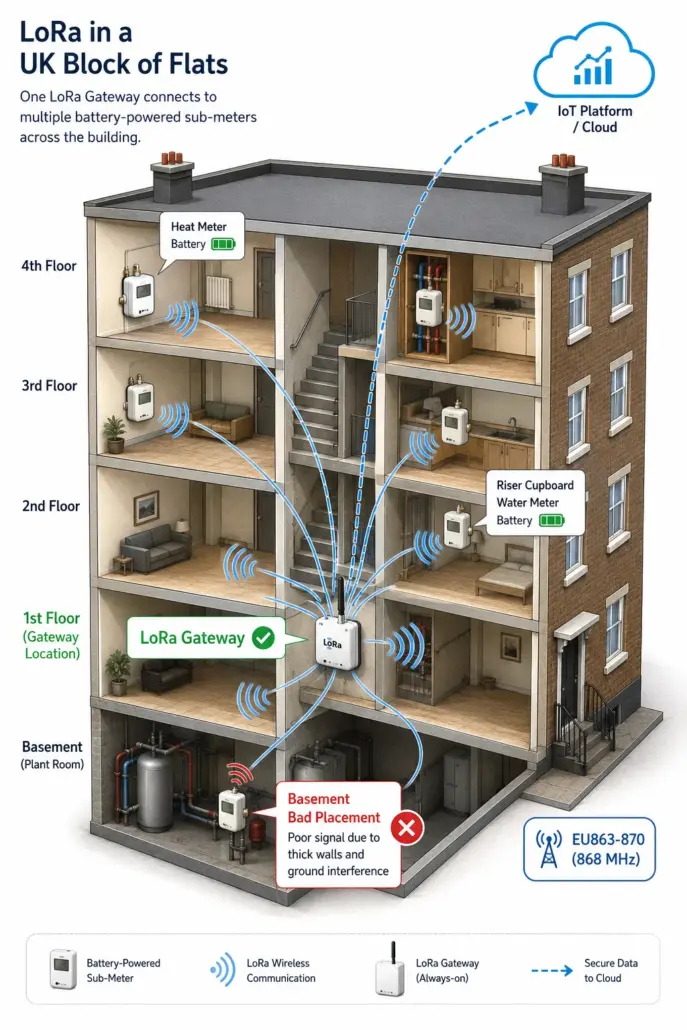
LoRa solves a specific landlord problem. If you have a building where running cable from each meter back to a gateway is hard, expensive, or impossible, a wireless network covers the same ground. The question is whether your building actually has that problem, and whether LoRa is the right wireless option for it. The radio works exactly as the spec sheet promises. The pitfalls are around where you put the gateway and how realistic the range claims are once thick walls get involved.
Is LoRa the right wireless choice for landlord sub-metering? Often yes, where wired M-Bus (Meter Bus) is impractical and there are enough meters to justify a gateway. LoRa (a low-power long-range radio technology) and its associated network protocol LoRaWAN (LoRa Wide Area Network) suit large blocks, listed buildings where you can’t run new cable, and properties with meters in awkward locations. It’s overkill for a single small HMO (House in Multiple Occupation) with a few flats, where M-Bus on a short cable run is cheaper and simpler. The defining strength of LoRa is range and battery life. The defining weakness is that “long range” outdoors becomes a much shorter range inside a thick-walled building.
Last updated: June 2026.
Key Takeaways
- LoRa is a low-power long-range radio technology. LoRaWAN (LoRa Wide Area Network) is the network protocol built on top of it. Together they suit landlord sub-metering where running cable is impractical.
- UK LoRaWAN operates in the EU863-870 (often called EU868) band. The binding conditions come through Ofcom (the UK communications regulator) and its IR2030 interface requirement, drawing on CEPT (European Conference of Postal and Telecommunications Administrations) recommendations and ETSI (European Telecommunications Standards Institute) standards.
- Outdoor range claims of several kilometres do not survive thick walls and basements. Plan for a much shorter, building-dependent range indoors and always do a coverage survey before committing.
- Battery-powered LoRa meters can last up to about 10 years in normal landlord use, depending on transmit interval, spreading factor, battery size and device class.
- For most HMOs with a few flats, wired M-Bus is cheaper and simpler. LoRa wins on larger, harder, or distributed buildings.
What is LoRa and why does it suit landlord metering?
LoRa is a radio modulation (the physical layer that defines how bits travel over the air). It was originally developed by Cycleo and is now maintained by Semtech, which acquired Cycleo in 2012. LoRa sends small amounts of data over long distances using very little power. LoRaWAN is the open protocol built on top of LoRa, maintained by the LoRa Alliance. It defines how devices talk to a gateway and how the gateway forwards readings to a network server and from there to a cloud platform. In landlord metering, you’ll almost always see the two together. Meters transmit using LoRa modulation and are organised into a LoRaWAN network, typically served by a single on-site gateway in a landlord deployment, with the network server behind it managing the traffic.
The fit with sub-metering comes down to a handful of properties working together. Battery life on the meter, because LoRa transmits briefly and infrequently. Building penetration, because the lower frequency band (around 868 MHz in the UK) carries through walls better than higher-frequency wireless protocols. The star topology, where one gateway can serve many meters across a building or campus from a central point without repeaters. And the licence-exempt spectrum, which means no per-device airtime fee.
For the technical background of how LoRa modulation actually works, see our earlier piece on LoRa technology. The rest of this article is about whether it fits your portfolio and how to deploy it without surprises.
How far does a LoRa signal actually reach in a building?
The honest answer is, much less than the marketing suggests. Vendor materials often quote multi-kilometre ranges (figures over 10 km in rural environments and a few kilometres in dense urban environments appear in The Things Network’s reference material). Those figures are line-of-sight or near-line-of-sight, measured outdoors. Inside a building, especially through reinforced concrete, basements, or stone walls, the real-world range is dramatically shorter and depends entirely on the construction. There is no single indoor range figure that holds across buildings.
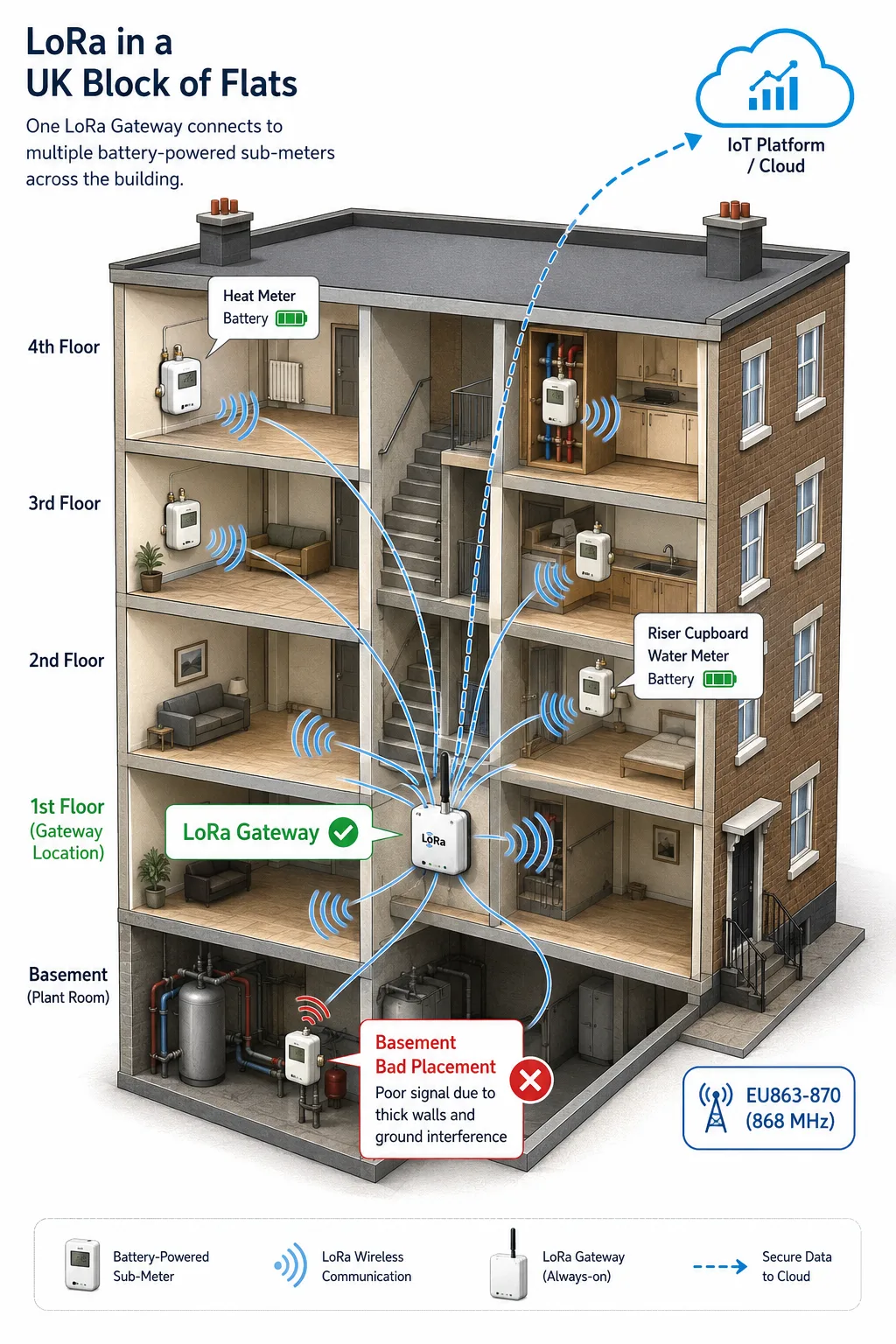
What this means in practice. A LoRa gateway placed in a central first-floor cupboard can usually cover a four-storey block of flats with no problem. A gateway placed in a basement plant room behind concrete walls might struggle to reach the top floor of the same building. A gateway in one building rarely reaches meters in another building across a courtyard without a clear line of sight or a higher-up mounting.
Plan with the worst meter location in mind. If a single meter is going to sit behind a fire-rated wall and a metal cabinet, that meter is your binding constraint, not the average meter. A 5-minute survey with a LoRa coverage tool from your supplier saves a fortnight of “why isn’t this one reporting” later.
How long do LoRa battery-powered meters last?
Battery life on a LoRa sub-meter is usually quoted up to around 10 years. That figure is plausible and achievable, but it isn’t automatic. The actual life depends on several settings the installer or platform controls.
How often the meter transmits. A meter that reports every day uses far less battery than one that reports every hour. For tenant billing on monthly invoices, daily is plenty. Anything more frequent is consuming battery for no commercial benefit.
The spreading factor used. LoRa adjusts how much time it spends on air to reach the gateway. A meter close to the gateway can use a low spreading factor and transmit quickly. A meter far away or behind walls needs a higher spreading factor and spends longer transmitting each time, which drains the battery faster. Place the gateway sensibly to keep most meters on a low spreading factor.
Whether the meter is in Class A, B, or C. Class A is uplink-mostly and uses the least power. Class B opens scheduled receive windows. Class C listens almost continuously and is much heavier on battery. For sub-metering, Class A is normal and the battery life figures assume it.
Do I need a private LoRa network or can I use a public one?
For a landlord setup, a private network is almost always the answer. You install your own gateway on the building, point your meters at it, and route the data to the cloud platform of your choice. The gateway is a one-off purchase and you own the network. No ongoing per-device subscription is paid to a public network operator.
Public networks exist (The Things Network being the best known) and can work if your building happens to sit inside good coverage. The catch is that public network coverage is patchy and unpredictable, especially indoors. You don’t control the gateway placement, and if the local coverage degrades, your meters silently stop reporting.
The distinction that matters is service guarantees, not public versus private as such. A community network with no service level agreement is the wrong basis for revenue metering; a commercially supported network with a contract, or your own gateway, puts reliability under something enforceable. For most landlords the private gateway is the simple answer, because the hardware cost is modest and the network is in your hands.
What does a LoRa metering setup cost?
The cost of a LoRa metering install breaks into the gateway (a one-off purchase), the meters (slightly more expensive than equivalent wired meters because of the embedded radio), and the cloud platform (a monthly subscription per meter or per site).
For a typical landlord building the gateway is a one-off purchase that is small next to the meter total, the meters carry a premium over equivalent wired meters for the radio, and platform subscriptions vary widely depending on what features you need. A read-only dashboard is one number, a full prepayment-plus-tenant-app platform is several times that. Get written quotes for each part rather than working from rules of thumb.
Always get written quotes for both hardware and ongoing subscriptions before committing. The treatment of platform fees varies a lot between suppliers, and the apparent cheapest hardware quote is sometimes the most expensive over five years once subscription is added in.
When is LoRa the wrong choice?
LoRa is genuinely the wrong choice in a few specific situations.
A small building with a handful of sub-meters and obvious cable routes. Wired M-Bus is cheaper, simpler, and bus-powered, so its meters usually have no battery to worry about. LoRa is overkill.
A property with one or two meters that’s geographically isolated. A SIM (Subscriber Identity Module) card and a cellular meter is often a better answer here. You skip the gateway entirely. NB-IoT (Narrowband Internet of Things) or LTE-M (Long Term Evolution for Machines) cellular variants are designed for exactly this case.
A site that needs sub-second polling or real-time control. LoRa is fundamentally a low-duty-cycle protocol. If you want to read a meter every second, look at wired M-Bus or wired Modbus over RS-485 (the serial communications standard used by Modbus RTU).
A building with the wrong physical layout. Reinforced concrete tower blocks, deep basements, or shielded plant rooms can defeat LoRa coverage even with careful gateway placement. If a coverage survey says no, believe it and look at wired options or cellular per meter.
LoRa versus the wired and cellular alternatives
For a landlord weighing the three serious options, the comparison that matters is what fits the building.
| Feature | LoRa wireless | Wired M-Bus | Cellular: NB-IoT (Narrowband Internet of Things) or LTE-M (LTE for Machines) |
|---|---|---|---|
| Best for | Larger, harder-to-cable, or distributed buildings | Small to medium buildings with sensible cable runs | One-off properties without an on-site gateway |
| Power | Battery on meters, mains on gateway | Bus-powered meters, no separate power needed | Battery on meters, signal-dependent drain |
| Range constraint | Building construction matters more than distance | Cable run length | Mobile signal at the meter location |
| Hardware cost | Gateway plus battery meters | Cheap meters plus cable | SIM-equipped meters, no gateway |
| Ongoing cost | Platform subscription | Platform subscription | Per-meter SIM plus platform subscription |
| Battery life on meters | 5 to 10 years typical | Bus-powered; batteries rarely needed | Varies, often shorter than LoRa |
“The thing that catches landlords out most on LoRa installs is gateway placement. People treat it like a Wi-Fi router and stick it on the wall of the meter cupboard, which is usually a basement or a thick-walled riser. Then half the upper-floor meters can’t be heard reliably and the customer calls us asking what’s wrong with the LoRa. There’s nothing wrong with the LoRa. The gateway is in the worst possible place for it. A 30-minute coverage survey with a single test meter, walked round the building, tells you where to mount the gateway. Skip that step and you’re chasing intermittent dropouts for months.”
Meters UK technical team
Common Mistakes Landlords Make
A few patterns recur on LoRa landlord projects.
Mounting the gateway in the worst possible spot. The basement plant room or a metal-doored cupboard kills coverage on upper floors. Aim for somewhere central, elevated, and with as few walls as possible between the gateway and the furthest meter.
Trusting outdoor range figures for indoor buildings. The 5 km figure on the spec sheet refers to a clear field with a roof-mounted antenna. Inside a building, you should be planning for tens of metres to a couple of hundred metres depending on walls. Always do a coverage survey before specifying meter locations you can’t easily move.
Building revenue metering on a network with no service guarantee. Community networks like The Things Network are great for projects and demo gear, but billing needs predictable uptime under something enforceable: your own gateway, or a commercially supported network with a contractual service level. For most landlord buildings, run a private gateway.
Forgetting the duty cycle limit when scheduling reads. The UK 868 MHz band is duty-cycle-limited (1% in most of the band), and frequent reporting eats into that budget at a rate that depends on payload size and data rate. A daily report is normal for sub-metering and sits comfortably inside the limits; anything much more frequent needs the airtime maths done before you promise it.
How do I plan a LoRa metering network for my building?
A workable sequence for a landlord scoping a LoRa install on a new building.
Identify every meter location and the worst-case meter (the one in the most physically isolated spot). That meter is your binding constraint for gateway placement.
Choose where the gateway goes. Somewhere central, with power (mains or PoE, Power over Ethernet) and a backhaul connection (Ethernet, Wi-Fi, or cellular). Avoid basements and metal cabinets.
Do a coverage survey with a single battery test meter. Walk it to each planned meter location and confirm the gateway hears it cleanly. Iterate gateway placement if needed before specifying the rest of the install.
Specify the meters and the platform together. Check that the meters’ LoRaWAN version (1.0.x or 1.1) is supported by your chosen network server and platform. The gateway itself mainly forwards packets, but the network server and meter need to be compatible on join and security behaviour. Some meters are vendor-locked to a specific platform; ask before buying.
Confirm the duty cycle headroom for the reporting interval you actually want. For daily reads, you have lots of headroom. For more frequent reads, run the maths.